
Download Easy Account Manager – account management, finance app, budget tracker, personal finance, expense tracker, money management
Overview
Easy Account Manager is a desktop-oriented software application designed to streamline personal and business financial tracking. Developed by SndMs Mobile Apps, the tool enables users to manage multiple accounts efficiently, making it suitable for individuals with complex financial portfolios or small businesses requiring multi-account oversight. The software helps users monitor income and expenses, categorize transactions, and generate monthly or yearly summaries for better financial insight. Its core purpose is to simplify financial management through intuitive organization and structured data tracking.
Target users include freelancers, small business owners, and individuals managing multiple bank or digital wallets. The application supports collaborative workflows by allowing data sharing, which is particularly useful for couples managing joint finances or business teams working with accountants. Security is prioritized through password protection, ensuring sensitive financial data remains confidential. While the software is marketed as a tool for financial clarity and control, detailed real-world usage scenarios are not specified beyond general budgeting and transaction tracking.
The developer did not provide additional system requirements or platform-specific deployment details. As such, the full scope of integration with desktop environments remains limited to the provided information.
Key Features & Capabilities
- Multi-Account Management: Users can maintain and organize multiple financial accounts within a single interface, ideal for managing personal, business, and savings accounts simultaneously.
- Transaction Categorization: Each entry can be classified into predefined or custom categories, enabling structured tracking of income sources and spending habits.
- Monthly and Yearly Summaries: The software automatically compiles transaction data into visual summaries, offering a high-level view of financial trends over time.
- Password Protection: Sensitive financial data is secured with a user-defined password, preventing unauthorized access to account information.
- Data Sharing: Users can export or share financial records with others, supporting collaboration with accountants or co-managers in shared financial setups.
These features collectively support financial transparency and accountability. For example, a freelancer managing three income streams can use categorization to distinguish between client payments and side gigs, while a couple can share a single account file to track joint expenses. The ability to generate historical summaries also aids in long-term budget planning and financial goal setting.
User Interface, Workflow & Performance
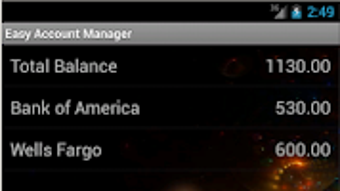
Easy Account Manager presents a clean, functional interface designed for straightforward navigation. The layout prioritizes ease of use, with clearly labeled sections for adding transactions, viewing account balances, and accessing summary reports. Users can expect a linear workflow: input data → categorize entries → review summaries → share or export when needed.
Navigation is consistent across core functions, reducing the learning curve for new users. The application appears optimized for efficient data entry, with minimal steps required to record a transaction. However, exact performance details were not specified. The developer did not provide information on CPU or RAM usage, nor did they share benchmarks for responsiveness under load.
Stability and resource behavior are based on general software behavior patterns. No user-reported crashes or freezes were referenced in the provided data. The software’s lightweight footprint—10.2 MB in size—suggests minimal system impact, though real-world performance may vary depending on the device and number of stored transactions.
Compatibility & System Requirements
Easy Account Manager is designed for Android devices, as indicated by the provided operating system. The software version is 2.1.1, with a file size of 10.2 MB. The developer did not specify exact system requirements, such as minimum RAM, processor type, or storage space needed for optimal performance.
Platform compatibility information is limited to Android. There is no confirmation of availability on Windows, Mac, or other desktop platforms. Installation size is minimal, which may benefit users with limited storage. The lack of detailed compatibility details means users should exercise caution when deploying the software on non-Android systems.
Exact system requirements were not listed. Compatibility with older Android versions or specific device models is not confirmed. Users are advised to verify device compatibility before installation.
Pros and Cons
Pros
- Supports multiple account management for improved financial organization.
- Intuitive interface with straightforward navigation and data entry.
- Offers transaction categorization and automated summary reports.
- Includes password protection for enhanced data security.
- Allows secure data sharing for collaborative financial tracking.
Cons
- Platform availability is restricted to Android; no desktop or cross-platform support confirmed.
- Exact system requirements and performance metrics were not provided.
- Limited information on update frequency or long-term maintenance.
- File size is small, which may indicate fewer advanced features compared to full-featured desktop tools.
- No details on cloud sync or backup functionality.
FAQ Section
Is Easy Account Manager available for Windows or Mac?
The software is currently available only for Android devices. There is no confirmed release for Windows or Mac desktop platforms.
Can I use Easy Account Manager offline?
Yes, the application functions without an internet connection, allowing users to manage accounts and record transactions in offline mode.
Is the app secure? Does it use encryption?
The app includes password protection to safeguard financial data. However, the specific encryption method used was not disclosed.
How often are updates released?
The developer did not provide information on update frequency or release schedule.
Is Easy Account Manager free to use?
Yes, the software is available at no cost. There are no in-app purchases or subscription fees mentioned.
Final Thoughts + CTA
Easy Account Manager delivers a focused, lightweight solution for users seeking to simplify their financial tracking on Android. Its multi-account support, secure password protection, and data-sharing capabilities make it a practical choice for individuals and small teams managing multiple financial streams. While the absence of desktop compatibility limits its reach, the app remains a solid option for mobile-first users who value simplicity and security.
For those managing personal budgets, freelancers tracking multiple income sources, or couples sharing financial responsibilities, this tool offers a reliable foundation. Its minimal system footprint and free access further enhance its appeal. However, users requiring advanced desktop integration or cloud-based collaboration may need to explore alternative solutions.
Download Easy Account Manager now




.png)


